
mPOP Utility2.0.0 - App Store
You'll be able to see results in few seconds.
Publisher Description

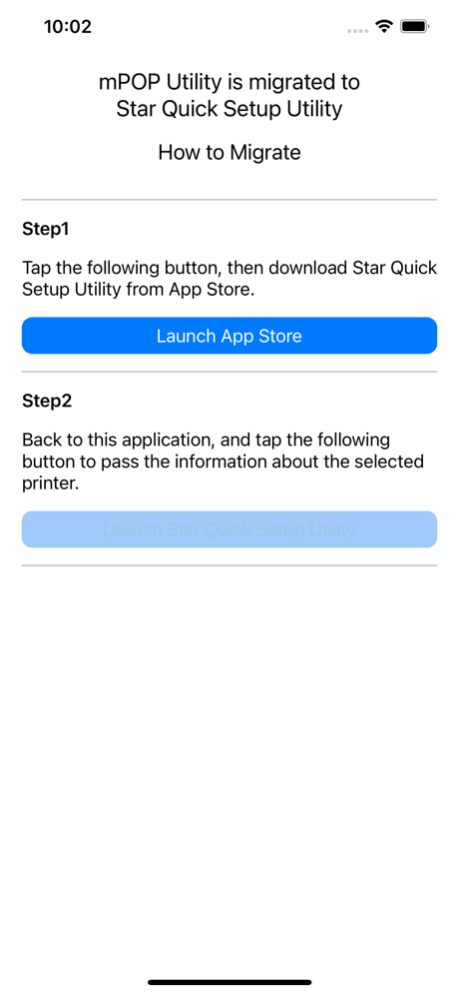
*** IMPORTANT *** mPOP Utility is migrated to our new Star Quick Setup Utility. The functions you have used previously are still available in Star Quick Setup Utility.
Compatibility: Requires iOS 8.0 or later.
mPOP Utility is special tool for mPOP provided by STAR MICRONICS.
It enables to do setup, operation test and setting change easily.
mPOP is stylish and compact POS station which 2 inch receipt printer and cash drawer are combined. mPOP is connected to iOS device through Bluetooth Classic. For the detail of mPOP, please refer to the marketing URL.
http://mpop.com/
The following functions are included in mPOP Utility;
**Installation**
- How to do Bluetooth pairing
- Operation test of printer
- Operation test of cash drawer
- Operation test of barcode reader
- Operation test of scale(*)
- Operation test of display(*)
- Check the status of mPOP
- Check the firmware information
(*)It is available in the later version of mPOP F/W Ver2.0.
**Sample receipts print**
- text receipts
- image receipts
- 3inch to 2inch image receipts1
- 3inch to 2 inch image receipts2
- coupon
- Rotate 90 coupon
**Setting**
- Memory switch setting
- Logo registration
- Maintenance counter
- Bluetooth setting
- Barcode reader setting
- Diagnose the firmware
**Help**
- Online Manual
- Setup Sheet
- Safety Instruction
- AllReceipts Site
- LED Blink Pattern
- Official Site
Jan 13, 2022
Version 2.0.0
*** IMPORTANT *** This "mPOP Utility" is migrated to our new "Star Quick Setup Utility". If you apply this update, you will be able to migrate to "Star Quick Setup Utility". The functions you have used previously are still available in Star Quick Setup Utility.
About mPOP Utility
The company that develops mPOP Utility is STAR MICRONICS CO.,LTD.. The latest version released by its developer is 2.0.0.
To install mPOP Utility on your iOS device, just click the green Continue To App button above to start the installation process. The app is listed on our website since 2022-01-13 and was downloaded 0 times. We have already checked if the download link is safe, however for your own protection we recommend that you scan the downloaded app with your antivirus. Your antivirus may detect the mPOP Utility as malware if the download link is broken.
How to install mPOP Utility on your iOS device:
- Click on the Continue To App button on our website. This will redirect you to the App Store.
- Once the mPOP Utility is shown in the iTunes listing of your iOS device, you can start its download and installation. Tap on the GET button to the right of the app to start downloading it.
- If you are not logged-in the iOS appstore app, you'll be prompted for your your Apple ID and/or password.
- After mPOP Utility is downloaded, you'll see an INSTALL button to the right. Tap on it to start the actual installation of the iOS app.
- Once installation is finished you can tap on the OPEN button to start it. Its icon will also be added to your device home screen.
Program Details
System requirements
Download information
Pricing
Version History
version 2.0.0
posted on 2022-01-13
Jan 13, 2022
Version 2.0.0
*** IMPORTANT *** This "mPOP Utility" is migrated to our new "Star Quick Setup Utility". If you apply this update, you will be able to migrate to "Star Quick Setup Utility". The functions you have used previously are still available in Star Quick Setup Utility.
Disclaimer
Official App Store Link
We do not host mPOP Utility on our servers. We did not scan it for viruses, adware, spyware or other type of malware. This app is hosted by Apple and passed their terms and conditions to be listed there. We recommend caution when installing it.
The App Store link for mPOP Utility is provided to you by apps112.com without any warranties, representations or guarantees of any kind, so access it at your own risk.
If you have questions regarding this particular app contact the publisher directly. For questions about the functionalities of apps112.com contact us.
